

AP Frequently Asked Questions
Transition from SAP to Marketplace
-
Where do I find the Employee Reimbursement Request in Marketplace?
The Employee Reimbursement Request is accessed from the Home page under the ���Forms��� tab in Marketplace. Use this link, , for a guide to submitting a request.

-
Where do I find the Direct Vendor Pay Request (formerly known as the e-NPO) in Marketplace?
The Direct Vendor Pay Request is accessed from the Home page under the ���Forms��� tab in Marketplace. Use this link, , for a guide to submitting a request.
-
How will we be able to confirm the billing is correct if we don���t see the invoices? And how will we be able to view the invoices?
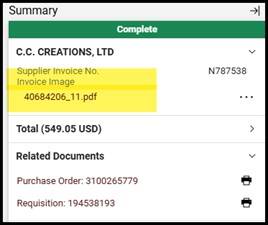
You can view the invoices in Marketplace. In the Summary section, an image of the invoice is available in a .pdf document. Click on the .pdf and the invoice image will be opened.
-
How will we review and approve invoices to ensure they are valid and accurate prior to payment being issued?
You can view the invoices in Marketplace. In the Summary section, an image of the invoice is available in a .pdf document. Click on the .pdf and the invoice image will be opened. If the invoice matches the purchase order, that is confirmation of invoice accuracy. If the invoice and purchase order do not match, the account manager will receive a Marketplace workflow task to validate and approve the invoice. If at any point a department has concerns regarding an invoice, please contact payables@txstate.edu or 512-245-2777.
-
Was an effective date given for the digital invoice capture?
The effective go-live date for digital capture was February 24, 2025. However, the rollout is gradual as we continue to work with the vendors identified to streamline the process for each vendor.
-
Can I see if an invoice has been paid in Marketplace?
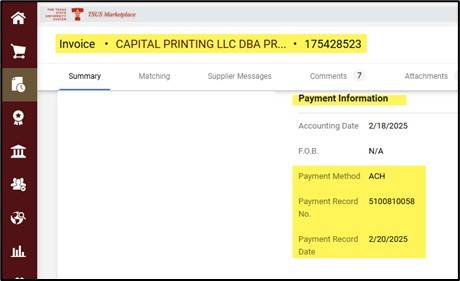
Yes, when viewing a completed invoice, if payment has been cut, the information will be displayed under the ���Payment Information��� in Marketplace.
-
Can I see the invoice status in Marketplace?
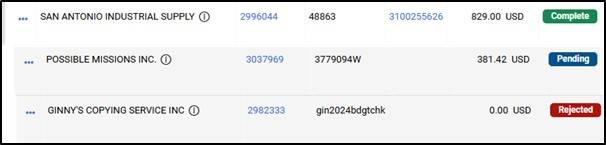
Yes, invoice status can be viewed in Marketplace. The following are examples of statuses that you may see when viewing invoices.
-
Can I view the pending workflow step in Marketplace?
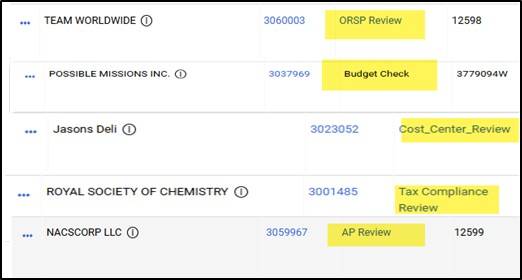
Yes, the workflow steps can be viewed in Marketplace. The following are examples of workflow steps that you may see in Marketplace when viewing invoices.
-
Can I change my view/layout of what I see in Marketplace?
Yes, use this icon to configure your view/layout.

See the link, , for more details.
-
Can I search for an invoice based on an account assignment like a cost center, internal order, GL, etc?
Yes. By using the filter options, invoices can be found based on account assignment field. Example is filtering by cost center that start with 14. See the link, , for more details.
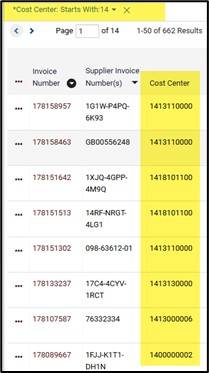
GLs & Cost Assignments
-
What GL code should be used?
-
After the invoice was paid, I discovered the wrong account was charged. How do I correct the charge on my account?
Complete an Interdepartmental Transfer (e-IDT) to correct the original document.
Forms
-
What type of back-up is required to support an e-NPO?
-
An original itemized receipt is required for reimbursement.
-
A credit card receipt with only the total amount is not sufficient documentation.
-
If the company is being paid directly, the invoice must include the remittance address.
-
-
What form do I use to request payment for a contracted service?
If the expense is a contracted service, please use the Contracted Services Payment Voucher (Form FS-03) located on the AP Forms page. Contact Procurement and Strategic Sourcing for questions about contracted services.
Goods Receipts
-
How and when do I need to submit a Goods Receipt?
When goods connected to a Purchase Order are delivered to the department directly from the vendor, the department must complete a Goods Receipt in order for the invoice to be paid. For SAP Z_MIGO instructions, visit the Materials Management & Logistics page.
Payments
-
I created a PO. When will it be paid?
An invoice and a goods receipt or signature approval are required for payment to be made against a PO. Payment is processed once all three matching pieces are received by Accounts Payable.
-
How do I search for a vendor number or find vendor information?
-
How do I search for an invoice payment in SAP?
This information should serve as a reference guide for reviewing payment questions and verification of vendor payments. Please review the instructions. -
The vendor has not received payment for an invoice, but the charge hit my budget. How did this happen?
When a valuated goods receipt is processed on a purchase order, the expense shown on the purchase order hits your budget. This means that your account could be charged before the invoice is paid. When payment is made, the expense is adjusted to reflect the actual dollar amount paid.
-
How do I pay a vendor who isn't in the university system?
* Complete the Texas State Vendor Maintenance Request/Substitute W-9 (FS-01) located on the Purchasing office's page.
* Vendor must complete the form and email to vendorrequest@txstate.edu. Contact Procurement at (512) 245-2521 with any questions.
* Once the vendor has been issued a vendor number, create your Purchase Order.
* Order your merchandise.
* Invoices should be emailed to payables@txstate.edu or mailed directly to Accounts Payable, PO Box 747, San Marcos, TX, 78667.
* Submit Goods Receipt or signature approval.
* Payment can be processed.
-
When can I use the generic vendor #700001?
One-time Vendors: Use vendor #700001 for payments to non-employees for refunds or reimbursements (including travel). These payments are issued by check unless for a foreign entity whose bank does not accept a U.S. bank check, which you will need to confirm with the foreign entity. In those cases, payment will be issued by wire transfer and you will need to complete an with all the required data. Note: All payments for services or products require a unique vendor number in SAP. For assistance regarding vendor maintenance, contact vendorrequests@txstate.edu.
Allowable Expenses
-
I am having a faculty or staff meeting. Can I buy small items (cookies, etc.) for the meeting?
Coffee and bottled water are permitted. Food items are only reimbursable according to the Business Meals Policy.
-
Is there a dollar limit to a retirement gift paid from university funds?
Based on tax regulations and UPPS, the gift must be under $400 to remain non-taxable. E&G funds is limited to $100. Other university or personal funds can be used.
-
Can I purchase a laptop computer or other asset on-line and get reimbursed?
No. A Purchase Order must be created for any asset. For specific questions about assets, please contact Cruz Jaimes in Materials Management.
Signatures
-
What signatures are required on the Contracted Services Payment Voucher (FS-03)?
The contractor's signature can either be emailed or faxed, but the Account Manager signature must be original. Required approvals are the Dean/Director, OSP (Grants), VP (if required), and Tax Specialist.
-
The PO was approved by the Account Manager. Why is approval needed on an invoice?
For PO's that do not require goods receipts, the approval confirms that the service/repair/installation was completed satisfactorily by the vendor. Approvals by departmental staff rather than requiring Account Manager approval on the invoice is allowed. This is consistent with the process for goods receipts as the Account Manager has already approved payment upon creation of the PO.